Showing posts with label phishing. Show all posts

Friday, July 31, 2026

Doing malware research without spending money

Just doing a quick write up of tools I use to do malware/threat research for free. Most of the time, I don't really have any company directly backing the research/analysis stuff I put on this blog. I'm also not a professional malware analyst/threat researcher, for what its worth.

(I wrote this myself. No AI was used)


I do recommend these courses if your employer pays:

https://paralus.co/online/ - Applied Threat Intelligence/Operational Threat Intelligence - I've done this course and it goes over handling IOCs, pivoting, and more.

https://academy.intel-ops.io/courses/hunting-adversary-infra - Hunting Adversary Infrastructure - I haven't done this course but I've seen the authors work on Twitter and Medium and it was interesting.


Regarding articles and finding things to research:

Hunt.io blog (https://hunt.io/blog) and Censys Arc blog (https://censys.com/censys-arc/)  have info about interesting things they've come across.

I also use this: https://start.me/p/wMrA5z/cyber-threat-intelligence which has links to various other sites/blogs.

You can always come up with your own ideas based on what you see or what you think you should see in an attack.


There are a bunch of tools in start.me link but I'm just focusing on things I use.

There is obviously VirusTotal. 

You can search hashes, domains, IPs, and etc and do limited pivoting off of it or move to other tools.

For files, the Details tab provides binary info which may include things like pdb path, certificate info, imphash, etc that you can pivot from (using other tools) or search on Google.

Relations tab will let you find related domains/IPs/files, etc which may lead to additional files. In some cases, this will provide in-the-wild URL where this file was downloaded from.

Behavior tab has sandbox results which again may help find additional IOCs which may lead to more files. You may see yara/sigma/suricata rules in here as well that may help with pivoting.


VirusTotal free does not let you download files.

If you actually want files, you may be able to use AnyRun, Hybrid-Analysis, Triage, VXUG, and Abuse.ch to acquire files.  You may also be able to ask for files in certain Slack and Discord channels. Make friends!


AnyRun, Hybrid-Analysis, and Triage also support basic searches like hashes, IP's, and domains. 

You can also obtain pcaps, memory dumps, dropped files, and other behavior data from these products.

These tools may report suricata/snort signatures. You can view sigs on Evebox: https://rules.evebox.org/

Hybrid-Analysis researcher account also supports searching yara signatures/string searches to find files. 

AnyRun Intelligence (https://intelligence.any.run) lets you also do complex behavior searches like if you wanted to search for a family that specifically writes a file to one very specific location or uses a very specific command. They also let you do yara searches. 


Abuse.ch provides multiple products that may be useful for tracking malware campaigns. 

Malware Bazaar has files. You can pivot off of various fields too.


Feodo Tracker has C2 info. This could be useful if you wanna monitor C2 with emulated malware or use C2 info to do more pivoting.

URLhaus has URLs for malware. 

YARAify lets you do yara scans on files but besides that, you can search files that have matched yara rules. 

Malware Bazaar, URLhaus, Yaraify all give you options to get notified based on various things such as yara match,  URL match, etc... It's under Hunting Alerts option. 


URLScan is another tool I use. I think a lot of people use this but never use the filtering options. Free account has limits obviously. You can see filters here: https://docs.urlscan.io/pages/search-api-reference#searchable-fields 


For IP's/infra, you can use Shodan, Censys, and other tools (listed in start.me link). 

Shodan and Censys both let you pivot off of certain fields, such as favicon hash, content hash, cert info, html page title, etc.. 


You can utilize Greynoise and AbuseIPDB for IPs. You just have to make sure you look at timestamp for events you see. Threat actors can just use a VPS for an hour then get a new one and have a completely different IP. 


Finally,  Github search and other tools that search github are very useful. These two exist beside just GH search feature:

Sourcegraph - https://sourcegraph.com/search

Grep App - https://grep.app/ 

You can search Github for certain strings/variables names or commands you may see during your analysis. You may discover analysis from other people or maybe source code.

Monday, November 21, 2022

Looking for EvilProxy - Notes

Introduction:

This started with someone asking about EvilProxy and any signatures for detecting it. 

EvilProxy is a phishing as a service (PhaaS), which can be used to capture credentials and cookies from a user auth, which also also works with MFA being enabled. It's essentially a reverse proxy that captures information for the attacker when you auth/start a session on a service that's doing reverse proxy for.

More information can be found here: https://resecurity.com/blog/article/evilproxy-phishing-as-a-service-with-mfa-bypass-emerged-in-dark-web

Similar projects include evilnginx, modlishka, and muraena.


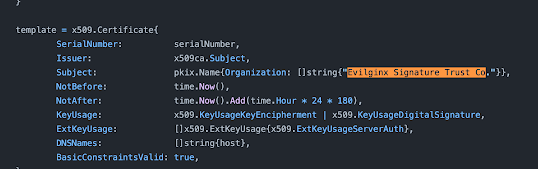
Usually for http/https traffic signature, we may want to look for status code, post/get parameters & pattern, URI pattern, JA3/JA3S, cert properties, html properties/body, and etc. 

Here's an example for evilnginx:


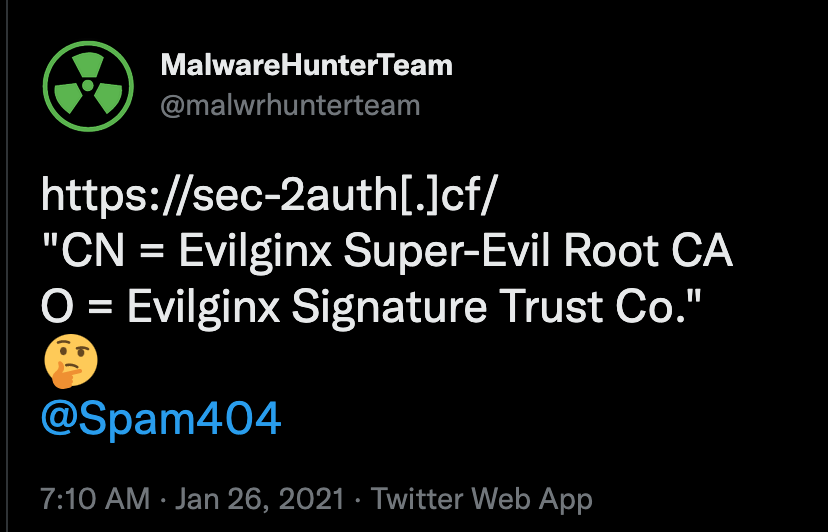
https://github.com/kgretzky/evilginx2/blob/master/core/certdb.go#L400

https://twitter.com/malwrhunterteam/status/1354039003121647624


There can be multiple types of detections as well. For example, detection of a service by utilizing scanning/scan response (shodan/censys) and detection from traffic monitoring (zeek extracting cert info and logging).


In this post, I'm just documenting just methods and what I've found researching EvilProxy. I don't have anything conclusive and from screenshots/videos the EvilProxy looks pretty thought-out and I'm sure it's easy for the devs to change behavior. They let you customize pretty much everything.

Notes:

Looking at the video shared by Resecurity, I see the following:


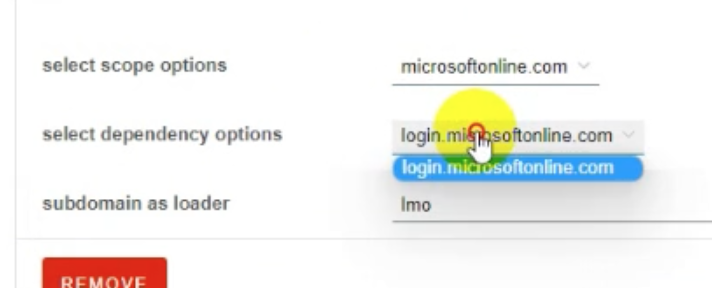
subdomain is set to lmo by default. 


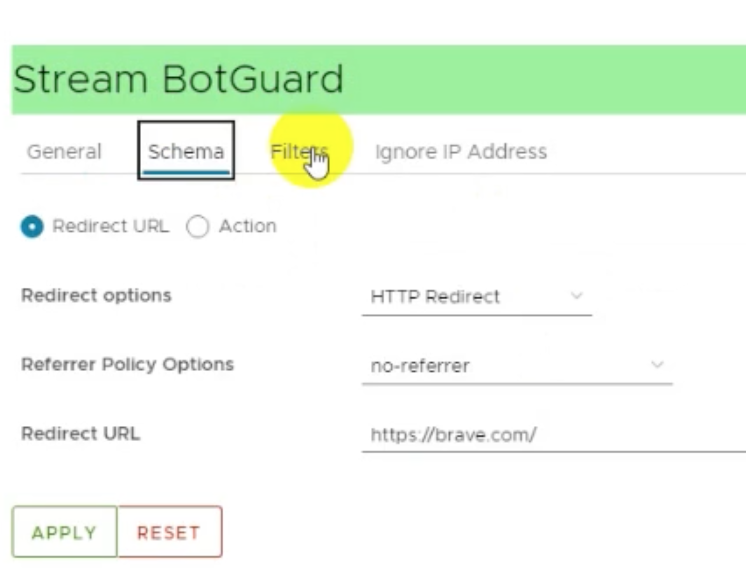
Stream BotGuard redirects to brave.com by default. Later on there is also redirect to example.com and office.com


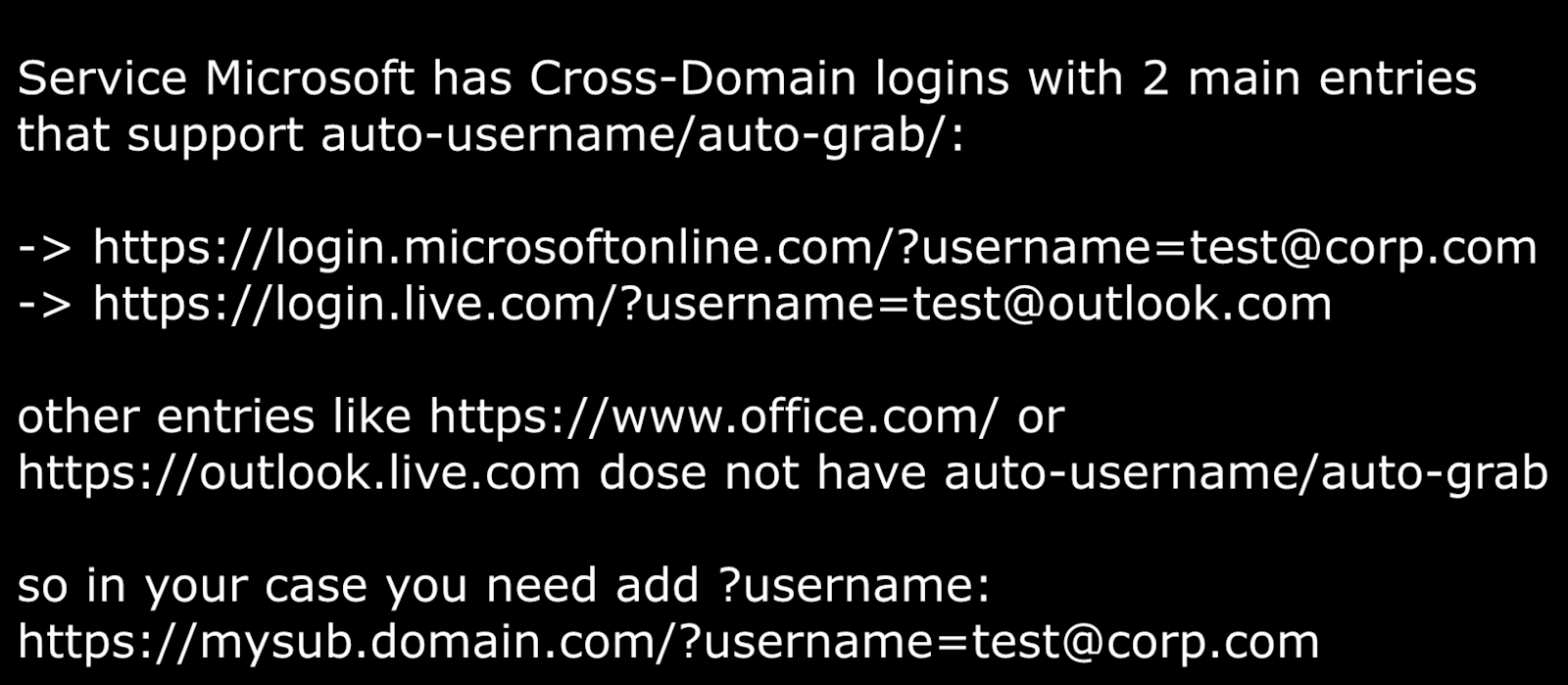
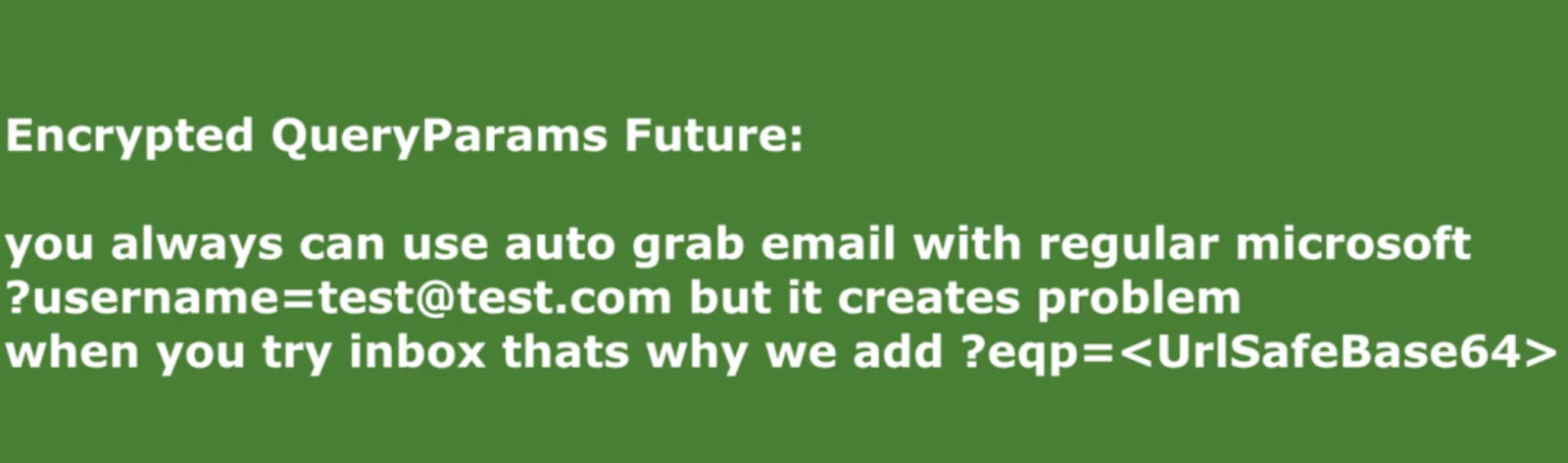
URL GET query can have username=email@example.com but that seems optional.

URL with eqp=base64_email_address is also supported.


Some of the interesting IOC's listed by Resecurity are:

  • 147[.]78[.]47[.]250
  • 185[.]158[.]251[.]169
  • 194[.]76[.]226[.]166
  • msdnmail[.]net
  • evilproxy[.]pro
  • top-cyber[.]club
  • rproxy[.]io
  • login-live.rproxy[.]io

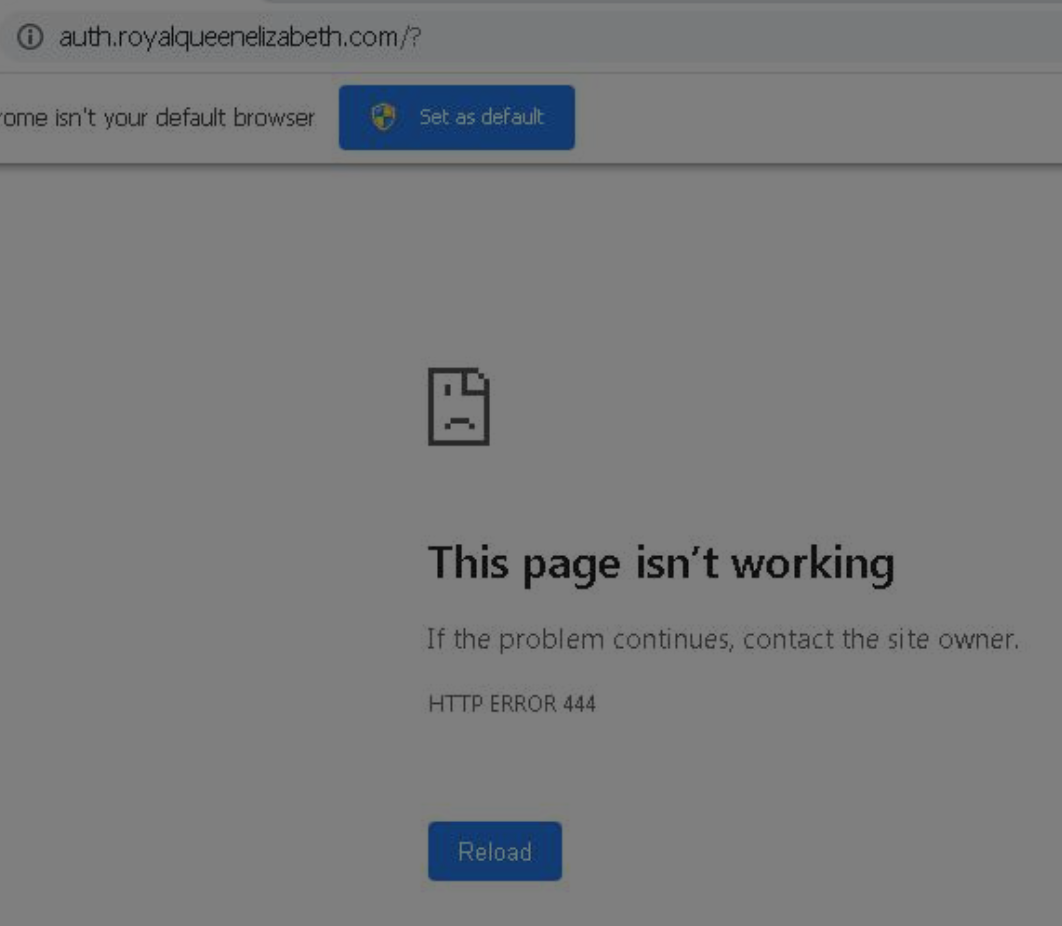
The other IOC comes from ThreatInsight/Proofpoint posting a domain and attributing it to EvilProxy phishing kit

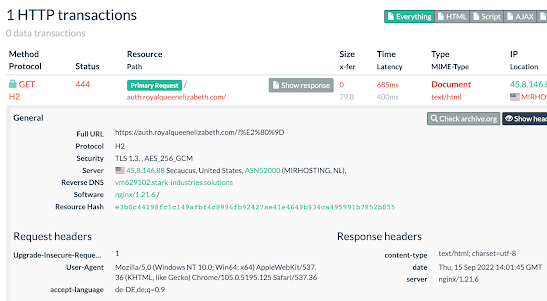
  • hxxps://auth[.]royalqueenelizabeth[.]com/?

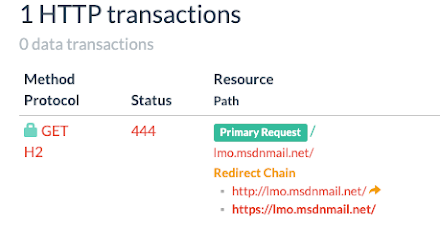
Status Code:

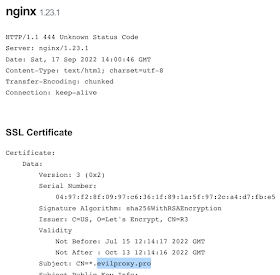
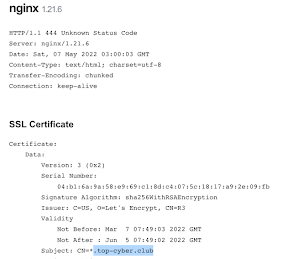
Searching for some of the IP's on Shodan and viewing history shows this:


Looking at webpage scan runs on Anyrun shows this:


This is what URLScan shows as well:


Maybe we can look for servers being used for EvilProxy phishing sites by looking for "444 Unknown Status Code"?

Censys Query: (services.http.response.status_code:444 and services.http.response.status_reason:"Unknown Status Code") and services.software.vendor=`nginx`

Shodan Query: http.status:444 "Unknown Status Code" "nginx"

URLScan Query: page.status:444 AND server:"nginx"

Shodan & Censys: out of 5 & 4 results, 2 IP's were publicly known for phishing.

URLScan showed a ton of data and it's easy to tell from the domain & subdomain names which sites are phishing:

The searching for 444 approach works fine but it doesn't seem to be too accurate when it comes to Shodan and Censys. It's much more useful when looking at URLScan though. 

Also, 444 doesn't show up for everything. It may have shown up for some of the domains due to misconfiguration possibly? i don't know.

Subdomain name:

The other approach for looking for EvilProxy domains could be using subdomain names (with maybe additional queries). This will likely have false positives and since EvilProxy offers a lot of configuration options, if the user changed the default settings, you wouldn't have too much success.

Some of the subdomain names EvilProxy has used are (based on VT & videos): lmo (microsoft), auth, login-live, wwwofc, accounts (google), mso (microsoft), github (github).

URLScan can be queried with: page.domain:(login-live.* OR accounts.* OR lmo.* OR auth.* OR wwwofc.* OR mso.* OR github.*) but github, auth, and accounts might lead to false positives.

This might be much better: page.domain:(login-live.* OR lmo.* OR wwwofc.* OR mso.*)


Crt.sh can also be searched for certs issued for some of the subdomains, however, that may not work very well since it looks like in the past wildcard certs were issued.

URL parameters/pattern:

One of the things we see above (in urlscan screenshot) is and in ThreatInsight/Proofpoint example is question mark '?' at the end of the URL. That could be searched for. Additionally, username= or eqp= can be searched for. Searching for /? and username= will lead to a lot of false positives. The search could be combined with some of the URLScan queries to potentially get less false positives.

URLScan query would look like this: page.url:"/?eqp=" NOT page.domain:ups.com


It kinda shows some malicious sites with some false positives. Also this search doesn't produce many results. At the time of writing, there were only 49 results.

Again, since EvilProxy is customizable, the parameters can be changed by the user. 

Redirects:

From the streams feature that was shown in the video, EvilProxy can perform actions such as redirect based on rules regarding the traffic source. Some of the defaults included brave.com, google.com and example.com. I'm sure other configuration settings include more redirections.

Only problem with this is, many sites might be doing these redirects, including other phishing kits so this doesn't mean source site is EvilProxy. The previous query for default subdomains can be combined to potentially get better results.

In URLScan this query provides results for any redirects to brave.com: page.redirected:off-domain AND ("brave.com") AND task.url:(login-live.* OR lmo.* OR wwwofc.* OR mso.*)

HTML Body:

One of the things I noticed while doing the following query: page.redirected:off-domain AND page.domain:(login-live.* OR lmo.* OR wwwofc.* OR mso.*) is that some of the screenshots for malicious websites look like this:


This results from some javascript which can be found here: https://urlscan.io/responses/e85dcff15d140f96a949d9a186c44edb2723e90073bc902d5e278ecad0d1661a/ 

I didn't spend too much time researching it but it looks like it may be trying to do fingerprinting. Some of the things in the javascript show up here: https://github.com/fingerprintjs/fingerprintjs/blob/master/src/sources/dom_blockers.ts 

Searching for javascript code that does fingerprinting in network traffic or on URLScan might be useful for hunting, however, I'd assume other people are using javascript to fingerprint so it might not always be useful.

The code kinda looks like this:


Essentially, it's title Wait... /title, script big_js_block /script, script let randomvar = base64 /script

Regex rule applied to http traffic might be able to find this maybe?

HTTP Requests:

While doing research/queries, I found a website that was not doing any redirection and is possibly EvilProxy (getting 444 on one of the pages related to this).

Traffic to this site shows the following POST request after fingerprinting:


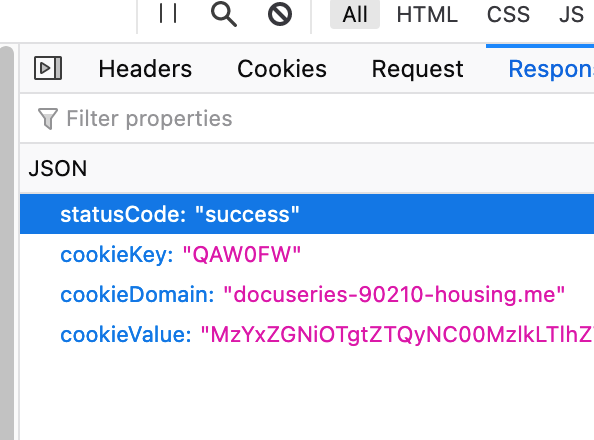
The response looks like this:

Once that's done, a cookie with cookiekey:cookievalue get's added to the session.

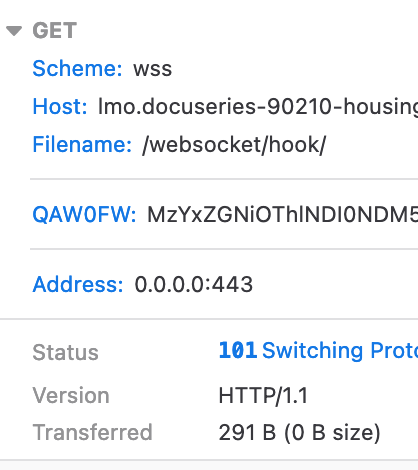
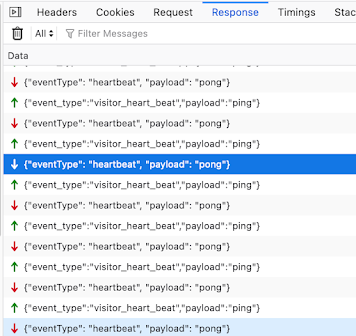
There is also a websocket connection/heartbeat, which doesn't happen with real microsoft login page:


The request for sending username/password look identical for the phishing site and normal login site.

websocket, fingerprinting POST, and response with cookies might be something that can be detected on wire if TLS/SSL interception and suricata/zeek monitoring is in place.


Conclusion:

EvilProxy offers a lot of customization so a lot of stuff mentioned above can be modified the by user but some users might just use default settings. 

Without a lot of attribution directly to EvilProxy and research out there, a lot of the stuff above is just an educated guess with the information I have available. I could be wrong about a lot of things. These are just notes and not anything conclusive.

Links:

https://resecurity.com/blog/article/evilproxy-phishing-as-a-service-with-mfa-bypass-emerged-in-dark-web

https://twitter.com/JeffreyAppel7/status/1591911982848172032/photo/1

https://www.microsoft.com/en-us/security/blog/2022/07/12/from-cookie-theft-to-bec-attackers-use-aitm-phishing-sites-as-entry-point-to-further-financial-fraud/

https://github.com/kgretzky/evilginx2

https://github.com/drk1wi/Modlishka

https://github.com/muraenateam/muraena


Wednesday, July 20, 2022

Screenshotting/scanning domains from certstream with littleshot to find interesting content

Introduction:

Certstream is a great service which provides updates from Certificate Transparency Log, which has info regarding certs being issued from several providers.

Certstream data has been used in the past for detection of malicious sites or phishing sites. There are several links in the resources section about certstream usage.

Littleshot is a tool similar to urlscan and urlquery(RIP) which I wrote a while ago because I wanted to be able to screenshot a ton of sites and collect metadata regarding them. (It's here: https://github.com/BoredHackerBlog/littleshot) I realized having yara scan html body would be cool so I added that feature as well later on. There is also a branch that uses tor for connections. It's not the most optimized project and error handling isn't the best but it's good enough for my purposes.

You can also put newly registered domains through littleshot as well but I've decided not to do that for now.

Goals:

- Take certstream domains and scan them with littleshot

- Utilize yara rules to look for interesting pages

- Send some metadata to Humio (littleshot by default doesn't do this) for either alerting, dashboarding, or just searching.

- Ensure that there is caching of domains from certstream to avoid rescanning domains

Tech stack:

I'm hosting everything on vultr. (Here's a ref link if you'd like to try vultr for your projects: https://www.vultr.com/?ref=8969054-8H)

- Littleshot

-- caddy - reverse proxy

-- flask - webapp

-- redis - job queue

-- python-rq - job distribution/workers

-- mongodb - store json documents/metadata

-- minio - store screenshots

- Certstream + python - Im getting certstream domains and doing filtering and cache lookup with python

- Memcached - Caching. I wanna avoid scanning the same domain twice for a while so i'm using memcached

Setup:

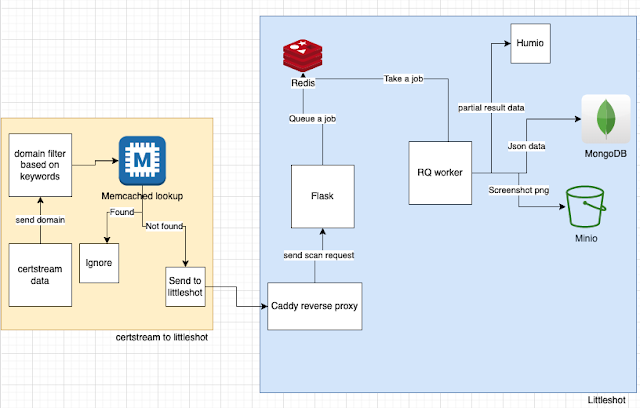
The diagram below shows the setup I have going.


I get data from certstream and I'm using some filtering to ensure that I don't scan certain domains.

Once the keyword based filtering is done, I check the domain against memcached to ensure that it hasn't been scanned before in the past 48 hours.

If the domain wasnt scanned in the past 48 hours, I queue to be scanned with littleshot.

When littleshot worker does the scan, it sends taskid, domain, title, and yara matches to Humio (besides just doing normal littleshot things).

Certstream_to_littleshot script - https://github.com/BoredHackerBlog/certstream_to_littleshot/blob/main/certstream_to_littleshot.py

Yara rules (these aren't the best. you should probably write your own based on your needs) - https://github.com/BoredHackerBlog/certstream_to_littleshot/blob/main/rules.yar

Worker code to support sending data to Humio - https://github.com/BoredHackerBlog/certstream_to_littleshot/blob/main/worker.py


Interesting stuff I came across:

- Lots of wordpress and nextcloud/owncloud sites and general stuff people self-host
- Carding forum?

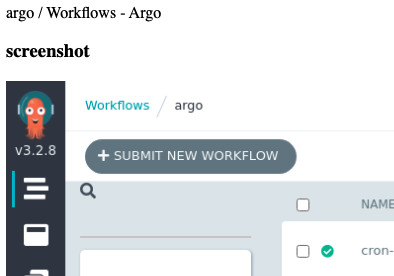
- Argo CI/CD without auth?
- Piracy site


No phishing sites or C2 with at least my yara rules.

Here are the yara hits in Humio (ignore abc,xyz, that was me testing Humio API):


What I would do differently with more time and resources (with this project and with littleshot):

- Better error handling - Current error handling is meh
- Get rid of mongodb and replace it with opensearch or graylog maybe? - Opensearch and graylog are great when it comes to searching.
- Potentially having a indicator list built into littleshot?
-- Currently tagging is based on yara rules but there are many ways to detect maliciousness, such as hash or URLs.
- Enrichment of data like urlscan does
- Better webui - the webui is pretty shit. idk enough html/css/javascript
- Better logging. There is logging of results but no logging of anything else (queries, crashes, etc...)
- Redirect detection & tagging. Some domains do redirect to legitimate login pages.


Resources & similar projects:

https://github.com/ninoseki/uzen - ninoseki github has really cool projects. This one is very similar to littleshot actually.
https://github.com/InfosecExtra/StreamshotY - littleshot fork that someone hooked up with certstream. It has a refreshing page of screenshots too like urlscan.


(if the blog post formatting looks odd, it's because Blogger editor interface hates me)